Made in Morocco · Windows 10 and 11
New: it finds what fills your drives, without breaking anything
A healthy PC, no computer skills needed.
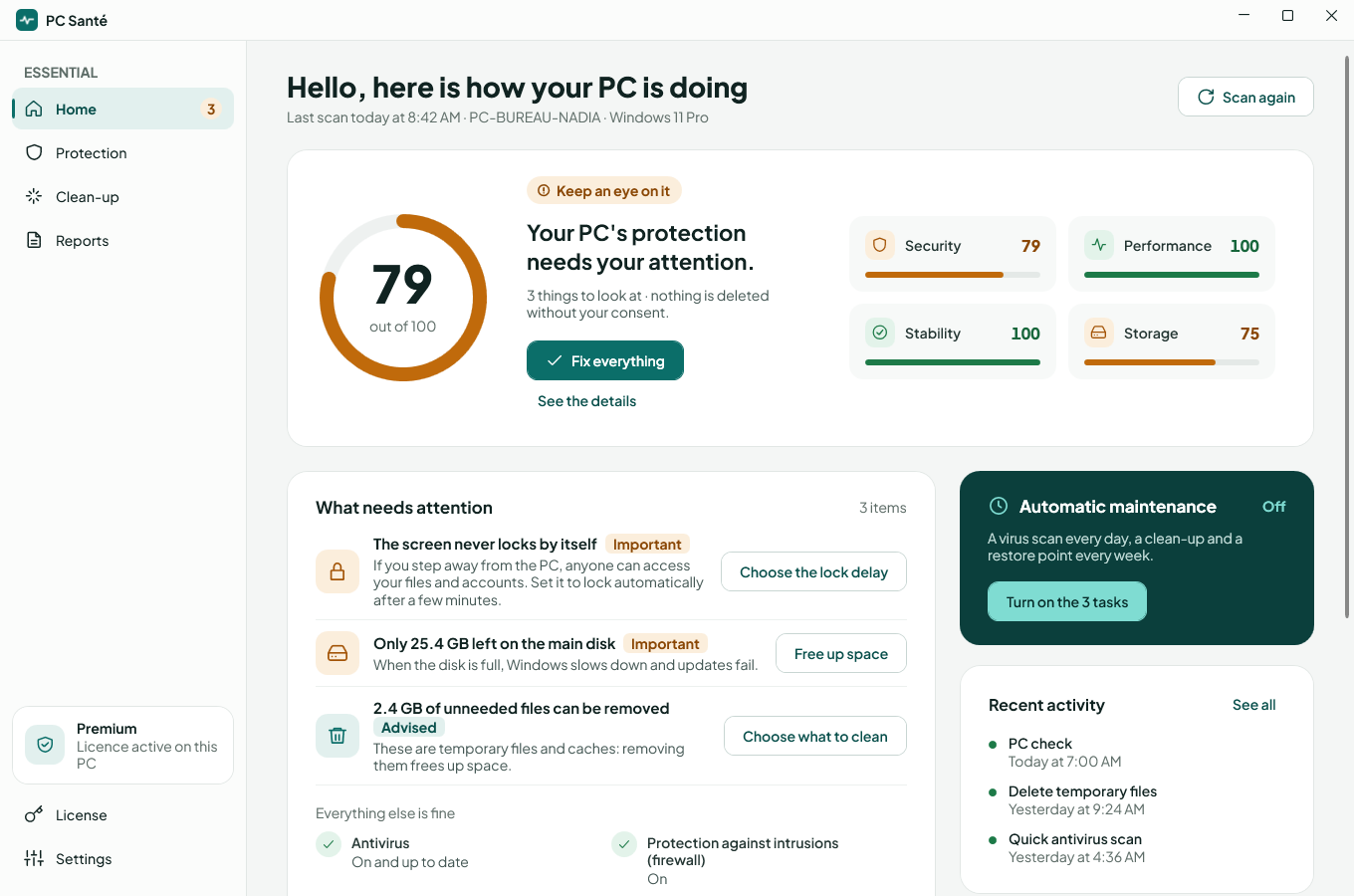
PC Santé checks your computer’s security, speed and condition, explains every problem in plain words, and fixes it in one click.
✓ In French, Arabic and English ✓ Support from Morocco ✓ Nothing is deleted without your consent
Protected
Antivirus, protection against intrusions, updates, screen lock, Wi-Fi: PC Santé checks everything and alerts you as soon as something weakens.
Fast
Cleans unnecessary files, sorts startup programs, finds big files: your PC starts and works faster.
Simple
A score out of 100, clear colours, a single “Fix” button. A restore point is created before any change: everything can be undone.
Autonomous technician
A technician that handles everything, from analysis to completion
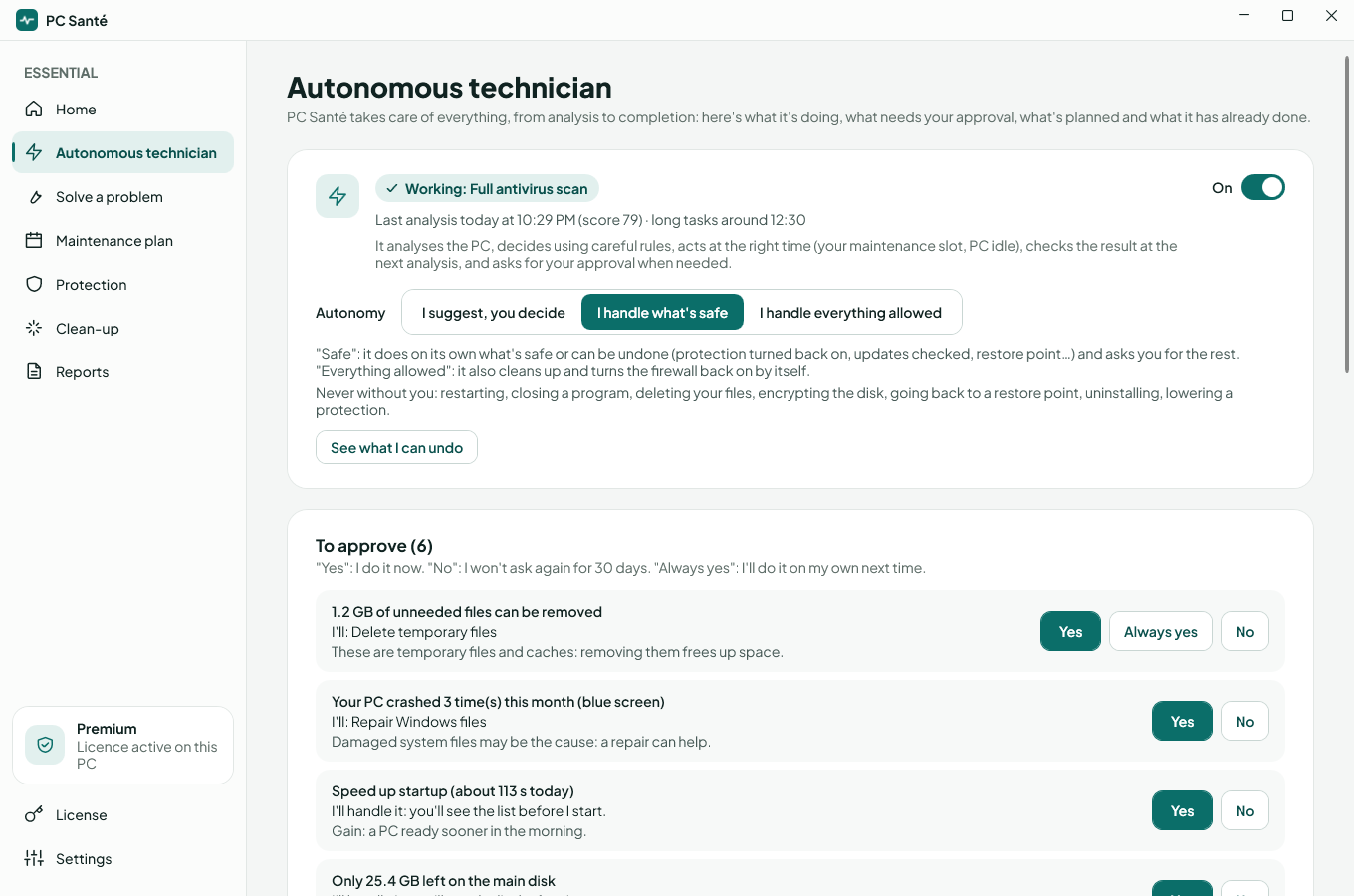
Turn it on, choose its autonomy, and it works on its own: it analyses the PC, fixes what is safe at the right time, checks the result at the next analysis and asks for your approval for the rest. You see everything: what it is doing, what is planned, what it has already done.
- Three levels of autonomy: “I suggest, you decide”, “I handle what’s safe” or “I handle everything allowed”.
- To approve: Yes, No or Always yes, and a notification when it needs you. Nothing is done without your “Yes”.
- Every intervention checked: “Done and checked” or “Not fixed yet” at the next analysis, and “Undo” for 7 days.
- Autonomous engineer: deep analyses, repairs suggested by the Windows logs and a service report as a PDF.
Maintenance plan
The whole machine, checked on a schedule
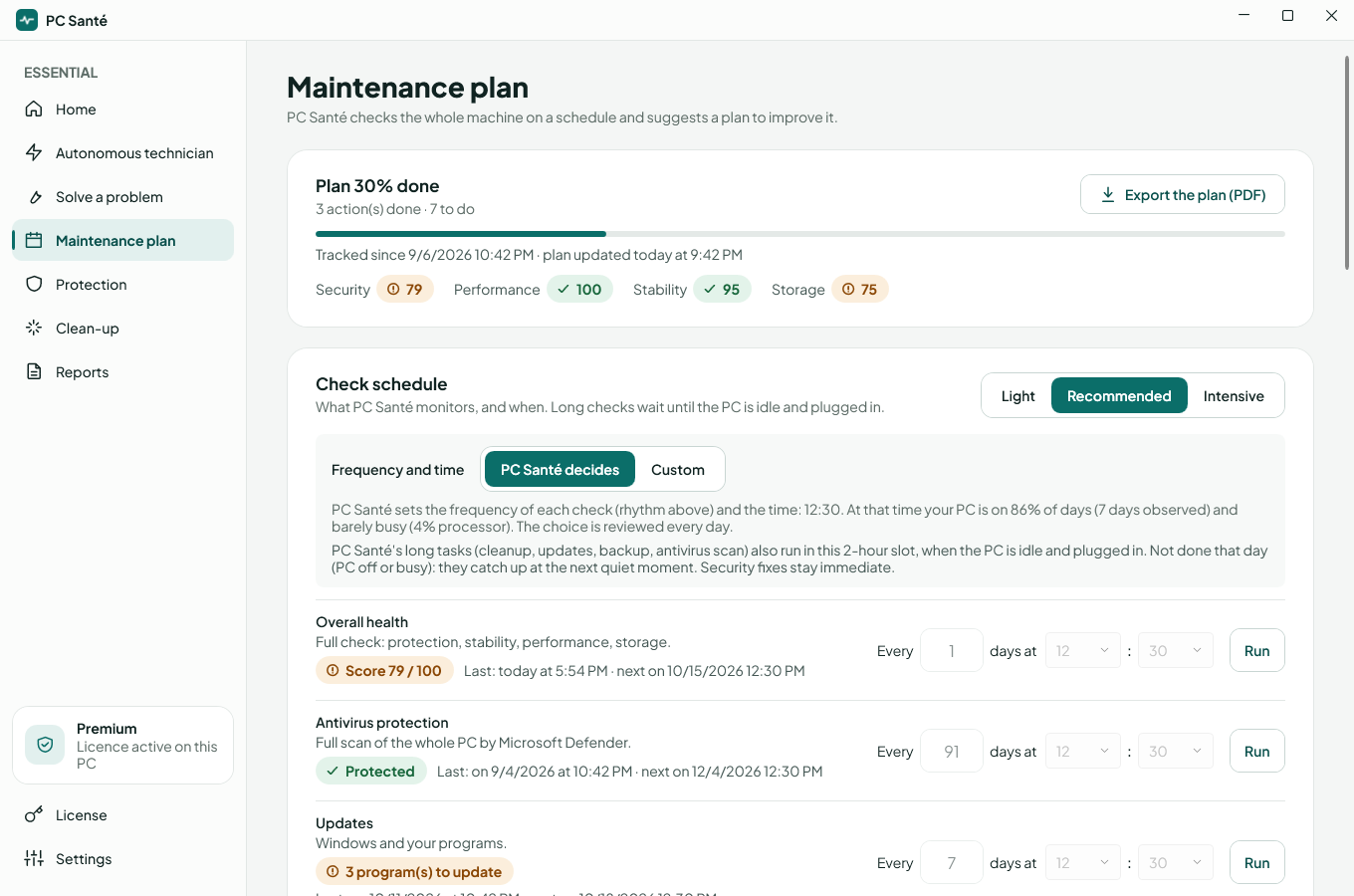
PC Santé checks security, performance, the disk, the battery and backups at regular intervals, when you are not working. It turns this into a clear improvement plan: what it does itself, what is waiting for your approval, and what is already fixed.
- At the best time: PC Santé picks the time when the PC is on and barely busy, or you set the frequency and time for all tasks (task by task with the Engineer plan).
- “Apply” does the work: cleanup, startup programs, updates, backup… PC Santé acts right there and each item turns to “done”.
- You can always go back: a restore point before every repair, and back to a date in one click.
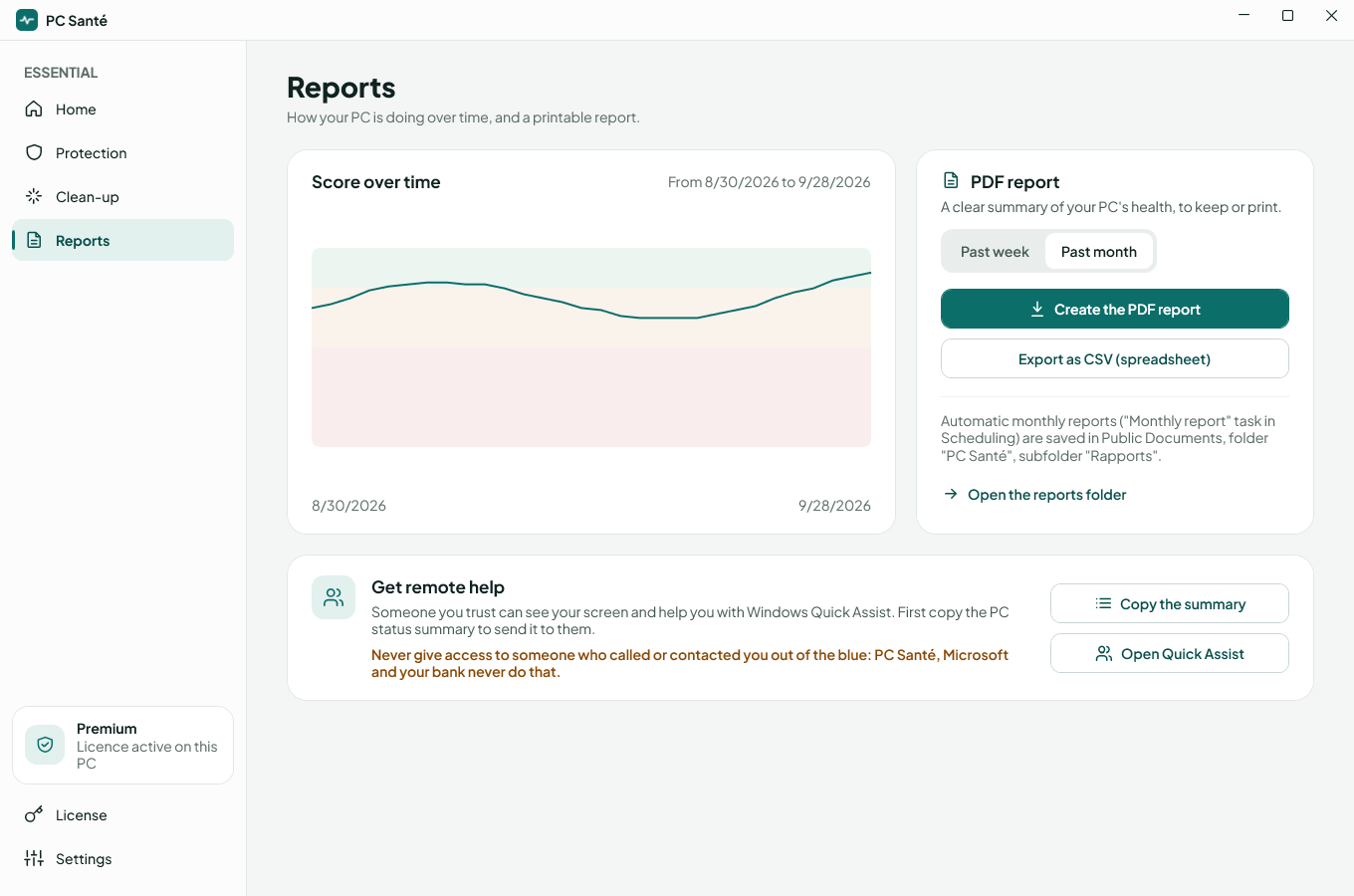
- Plan as a PDF: to keep, or to show the person who looks after your PCs.
My files
Your files backed up, wherever you want
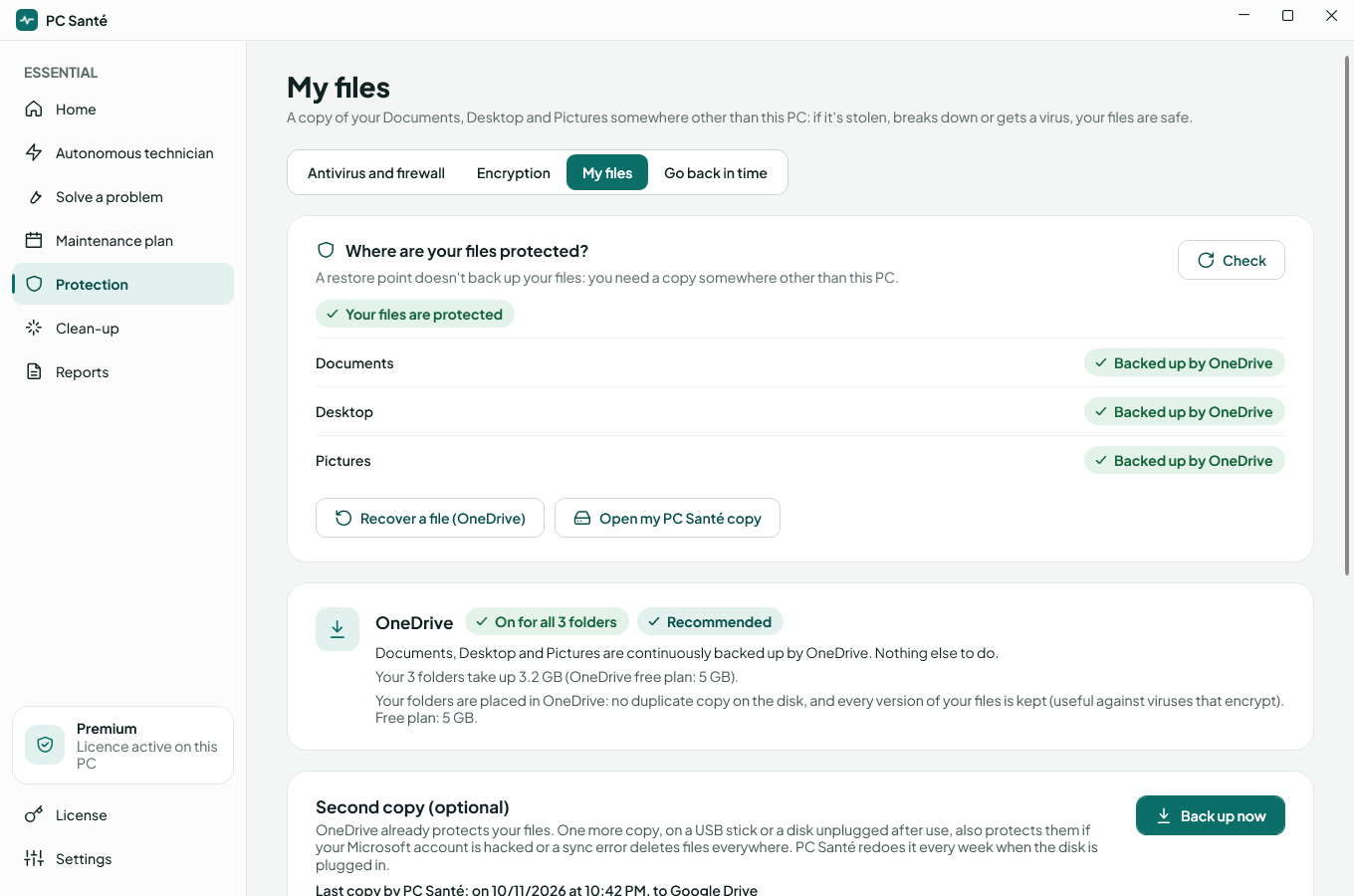
A restore point fixes Windows, but it does not back up your files. PC Santé checks that your Documents, Desktop and Pictures have a copy somewhere other than the PC, and redoes it for you every week.
- OneDrive: PC Santé checks each folder, turns on the backup with you and warns you if OneDrive stops or fills up.
- Google Drive, Dropbox, iCloud and others: the copy goes into their folder, with nothing else to install.
- USB stick, external disk or NAS: a weekly copy with your Windows account, no password kept by PC Santé.
- Recover a file: the OneDrive recycle bin and version history, or your copy, in one click.
Engineer plan
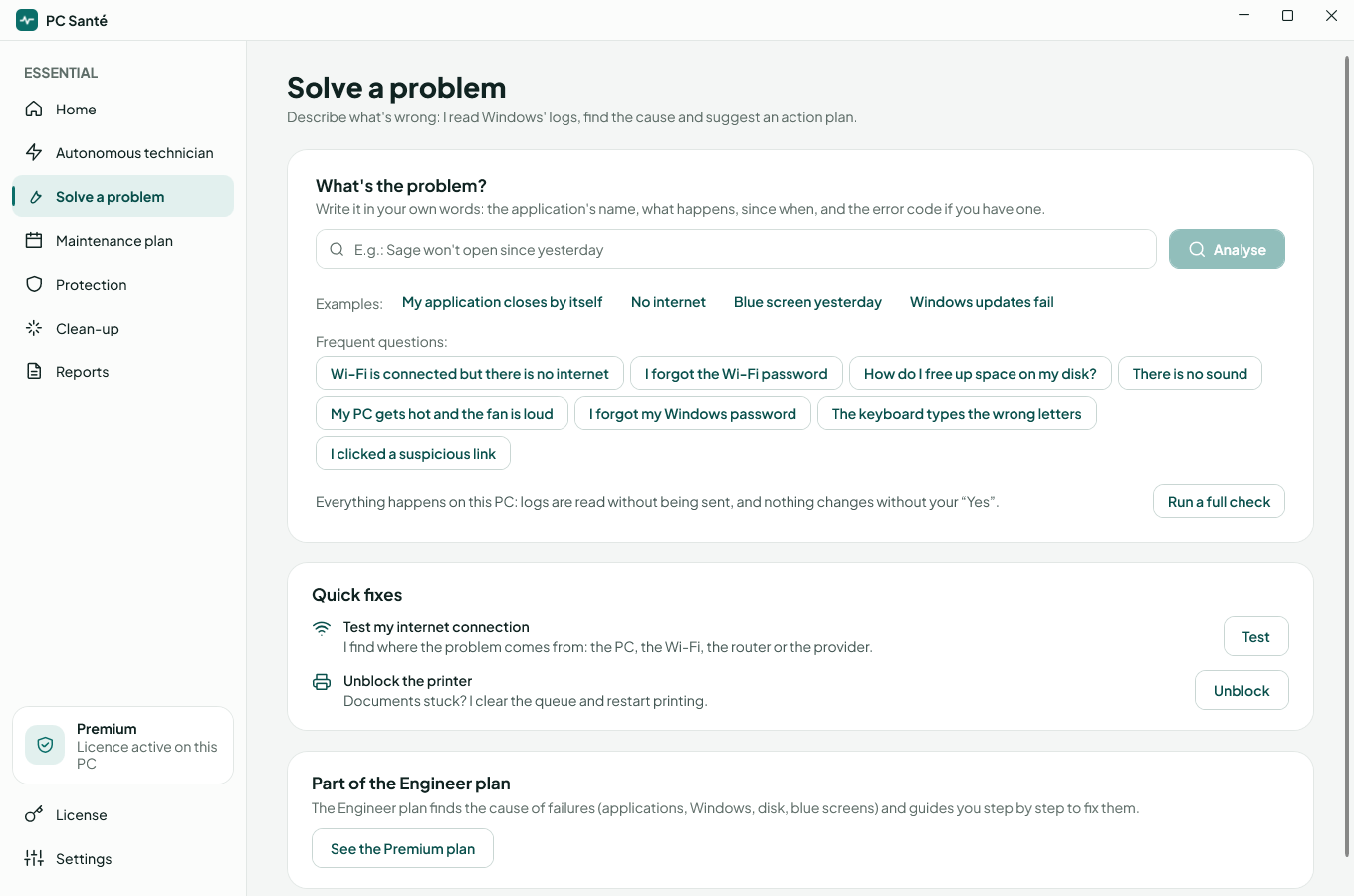
Describe your problem, it finds the fix
Write in your own words, in French, English or Arabic: “Outlook keeps asking for the password”, “my USB stick shows shortcuts”. PC Santé reads the Windows logs, recognises the problem and offers a step-by-step plan, each step only on your “Yes”.
- Over 90 common problems recognised: Wi-Fi, printer, Outlook, Office, viruses, battery, screen…
- Frequent questions: one click, and the answer appears.
- Always up to date: ALTIVAX adds solutions, your PC receives them without reinstalling anything.
- Deep repairs and an intervention report as a PDF, to pass on to a technician if needed.
Real-time guard: it reacts within seconds
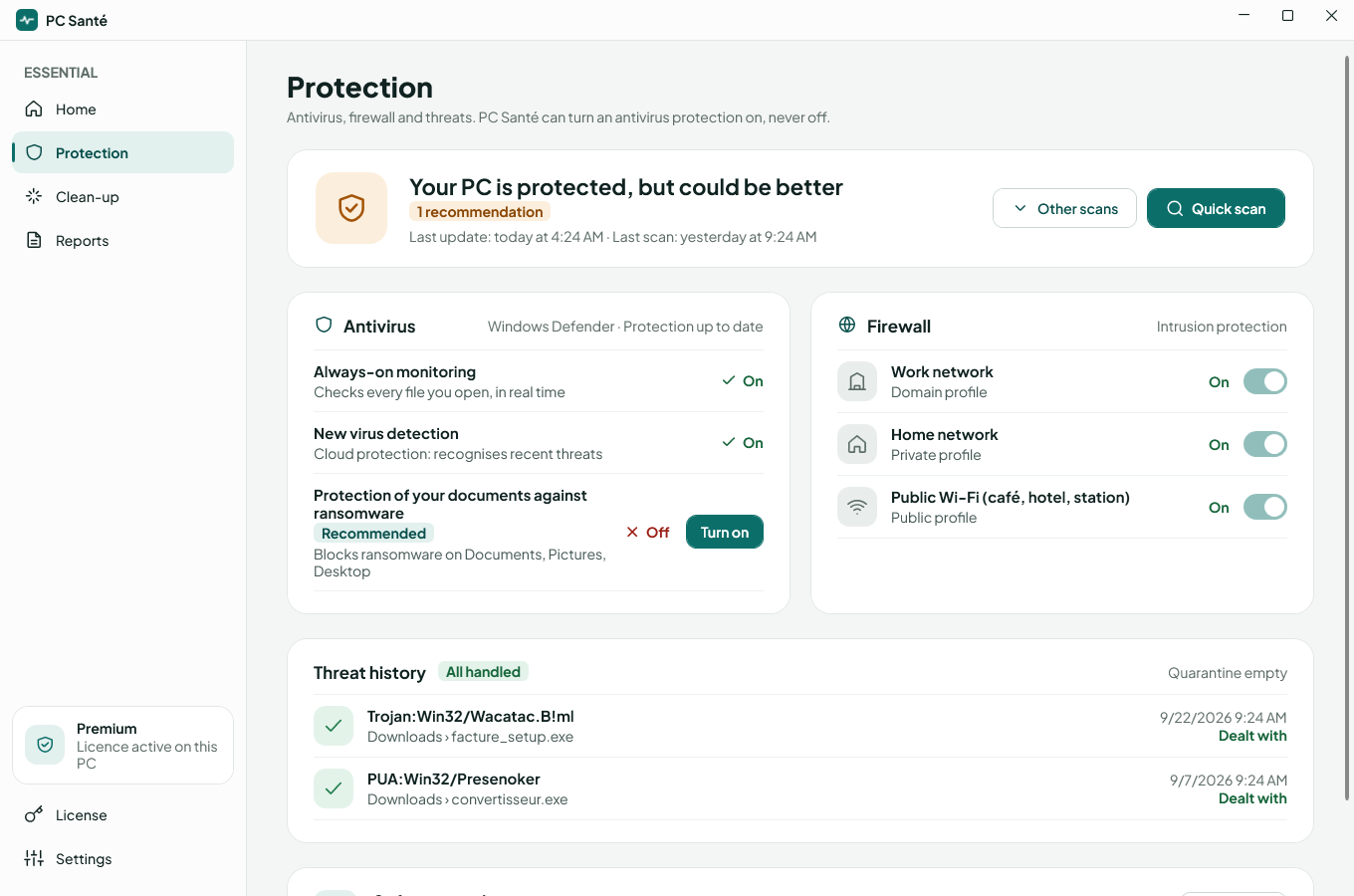
A program turns off your antivirus or firewall? A protection service stops? PC Santé sees it straight away, turns protection back on and lets you know.
- Antivirus, cloud protection and firewall watched at all times.
- Windows protection services restarted if they stop.
- Threat detected: you are told immediately.
- If Windows blocks any change, PC Santé guides you: one click is enough.
- A notification takes you to the right place: one click opens the screen about the problem, with the button that fixes it (“Close Google Chrome”, “Clean up now”…).
- You stay in control: need to turn a protection off? It explains the risk, respects your choice and reminds you.
Performance and stability
It spots what slows things down — and tells you why
PC Santé watches your PC continuously. As soon as a program overloads the processor, the memory or the disk, or an application closes on its own, it warns you in plain words — with the cause and the fix — and corrects what is safe.
- Overload spotted: it tells you which application is draining the processor, the memory, the disk or the connection, by its real name (“Google Chrome”, “Sage”…).
- Crash explained: “Word closed” with the likely cause (graphics driver, system file…) and what to do.
- Frozen application, memory leak, overheating, slow start-up: spotted and flagged in time.
- Disk almost full: it cleans up on its own and tells you.
My space
Get space back, without breaking anything
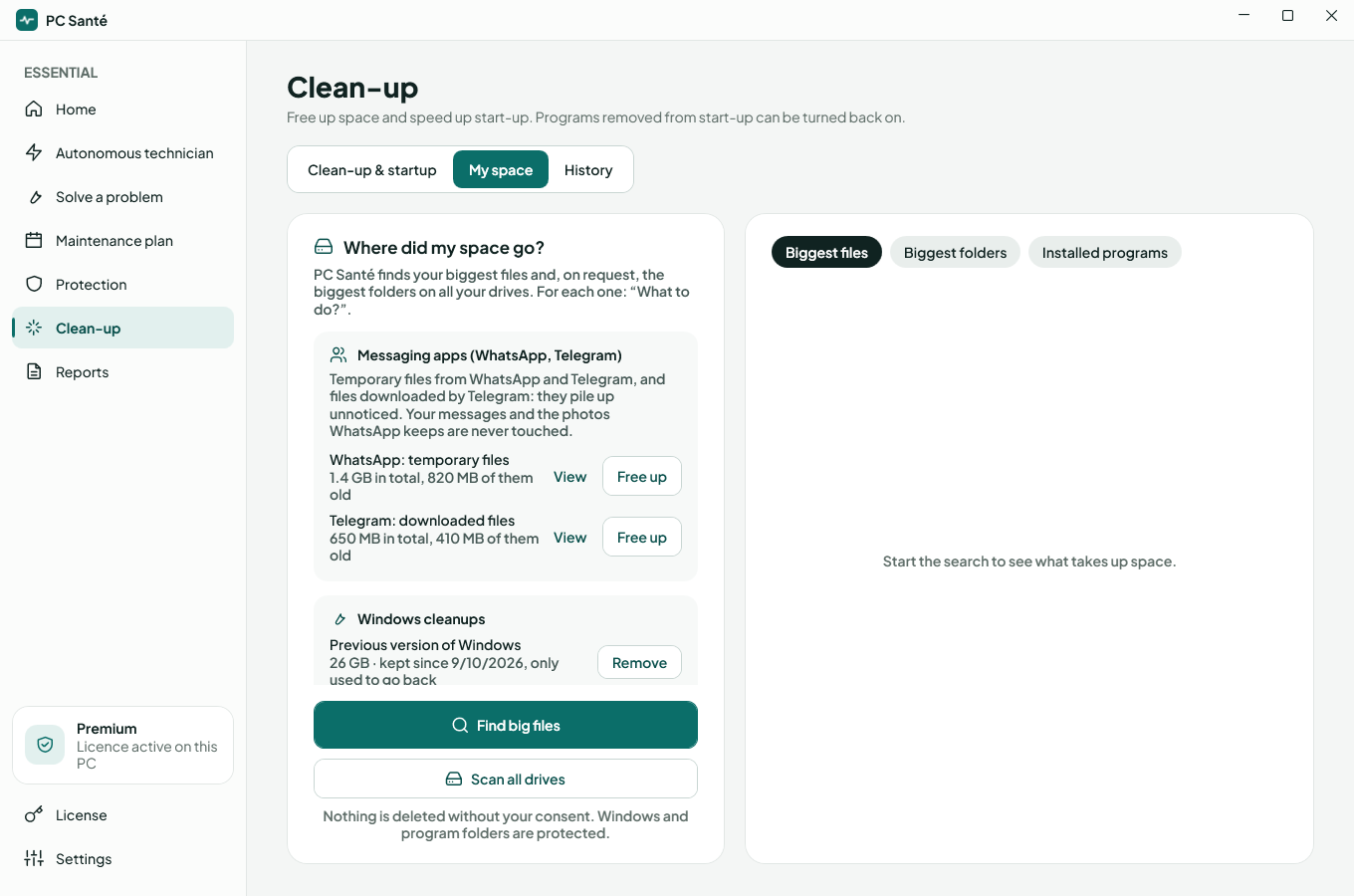
PC Santé shows you what fills your drives — all of them, not just C: — and tells you what to do with it. What belongs to Windows is protected: impossible to delete by mistake.
- Big files and big folders: “What to do?” — recycle bin, move to another drive, compress, keep only in OneDrive.
- Windows and program folders shown with a padlock: you see their size, you can’t break them.
- Risk-free Windows cleanups: previous version of Windows, components no longer needed.
- Installed programs: the space each one takes and uninstalling, with a warning for essential drivers and components.
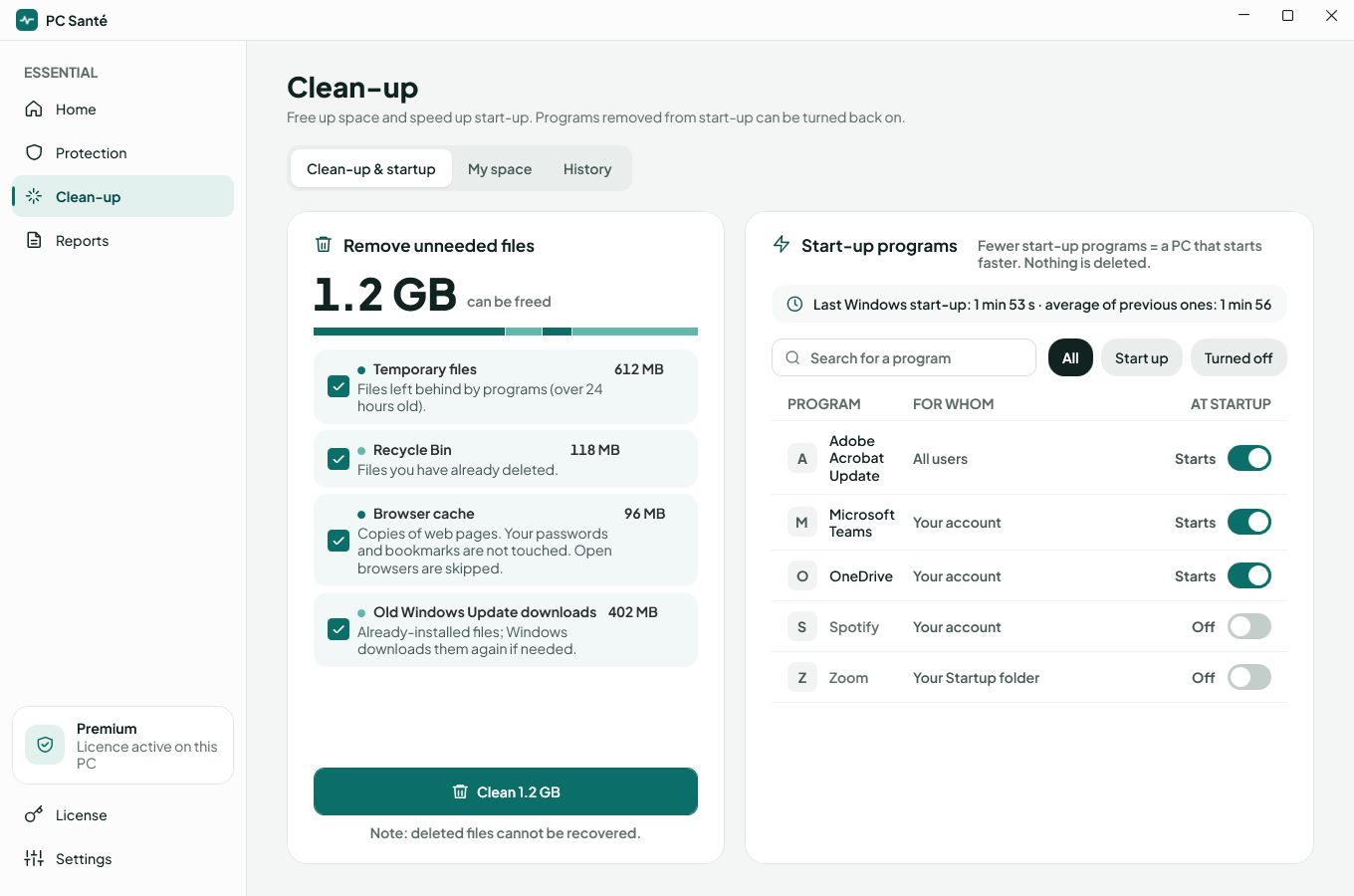
- Startup: based on what you actually open, it suggests programs to remove — you untick the ones to keep.
Everything PC Santé does
A full check-up, one-click fixes
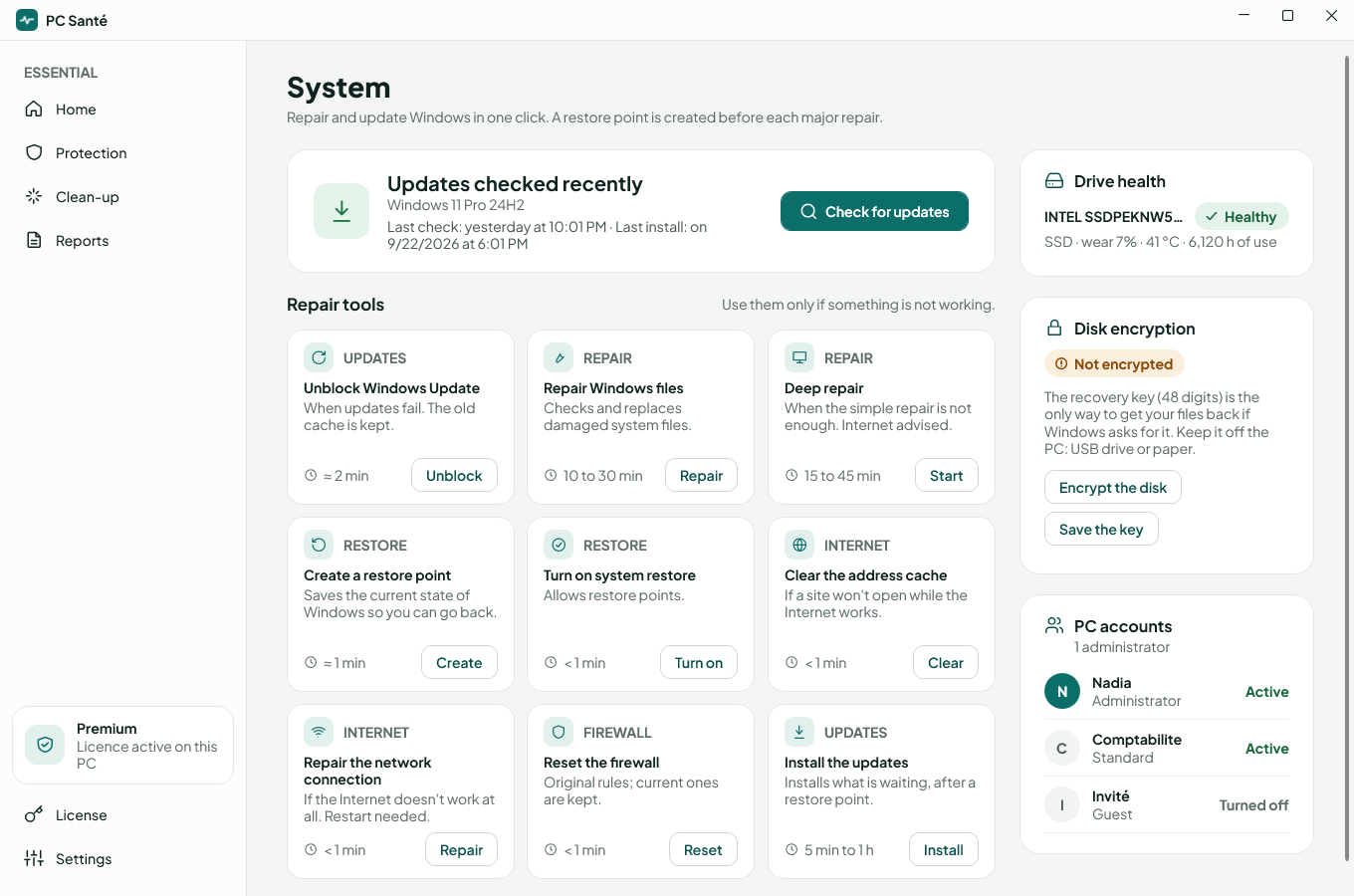
- Protection: Windows antivirus, firewall, Windows and software updates.
- Autonomous technician and real-time guard: background maintenance and a reaction within seconds.
- Watch agent: overload, crashes, full disk… spotted in real time, with the cause and the fix.
- Clean-up: temporary files, caches, recycle bin, forgotten big files.
- My space: big files and big folders on all your drives, installed programs, Windows cleanups.
- Startup: it suggests the programs you don’t use, measured startup time.
- Hardware health: disk condition, battery wear, temperature.
- Good habits: screen lock, unprotected Wi-Fi, backup of your documents (and an alert before the backup drive is full).
- Automatic maintenance: daily virus scan, weekly clean-up and restore point.
- Reports and remote help: printable PDF report, summary to send to the person helping you.
- Maintenance plan: the whole machine checked on a schedule, a clear improvement plan, and “Set everything up” in one click.
- Encryption: it checks your disk is really protected if the PC is stolen, and has you save the recovery key.
- Go back in time: a restore point before every repair, back to a date in one click, backup of your documents.
- Quick fixes: “Test my internet connection” (PC, Wi-Fi, router or provider?), “Unblock the printer”, space freed in WhatsApp and Telegram.
- Concrete proof: “What PC Santé has gained for you” (startup, space freed, threats blocked) and a PC health certificate in PDF.
In pictures
A clear screen for every need
What you gain
A PC that works well means time and money saved
A slow computer, a breakdown or a virus is expensive: hours lost, a technician to pay, sometimes lost documents. PC Santé acts before the problem happens.
Time recovered
Faster start-up, fewer slowdowns and breakdowns: a few minutes saved each week add up to hours over a year.
Fewer call-outs
Many small issues are fixed in one click, without waiting for or paying a technician.
Less risk
Antivirus on, updates done, documents backed up: a virus or data loss costs far more than a subscription.
A PC that lasts
Disk, battery and temperature monitored: you are warned before a failure and replace parts at the right time.
For every 1 MAD spent, you get back about MAD
Indicative estimate over 46 working weeks a year, using the assumptions above: change them to match your situation. This is not a promise of results. A technician call-out costs at least 400 MAD.
Why PC Santé
What changes with PC Santé
| Situation | Without PC Santé | With PC Santé |
|---|---|---|
| Antivirus turned off | You don’t know | Back on within seconds |
| Slow PC | You wait and lose time | Cleanup and lighter start-up in one click |
| Updates | Forgotten or stuck | Checked and unblocked |
| Failing disk | Found out too late | You are warned in time |
| A technical issue | Call a technician | Clear message and a “Fix” button |
Made in Morocco, for you
In French, Arabic and English, prices in dirhams, support from Casablanca.
Safe by design
Only planned and verified actions, a restore point before every important change, nothing deleted without your consent.
Your files stay with you
The analysis runs on your PC. No document is sent, no advertising.
Free trial
Start with the Free plan, upgrade to Premium whenever you like. Same price on renewal.
Pricing
A clear price, the same every year
No fake first-year discount followed by a doubled price: the price shown is also the renewal price.
Free
0 MAD
To know the condition of your PC.
- Health score and full diagnosis
- Mini-display and notifications
- Instant alert if protection is switched off
- Remote help
Most popular
Premium · 1 PC
149 MAD / year
All of PC Santé, fixes included.
- Everything in Free
- Autopilot and real-time guard
- One-click fixes and “Fix all”
- Protection, clean-up, startup, big files
- Software updates, PDF reports
- Maintenance plan and “Set everything up”
- Encryption, OneDrive, cloud or NAS backup
- PC health certificate
- Automatic maintenance
Family · 3 PCs
299 MAD / year
Premium on the 3 PCs at home.
- Everything in Premium
- 3 computers with a single key
- About 100 MAD per PC
Engineer · 1 PC
350 MAD / year
Premium + a maintenance engineer inside the software.
- Everything in Premium
- “Describe your problem”: it finds the cause
- Deep repairs: Windows, disk, drivers
- Autonomous engineer and PDF service report
- In-depth maintenance plan: logs, drivers, security
- Over 90 common problems recognised, kept up to date
Prices in Moroccan dirhams, for one year.
For businesses
All your PCs under control, without an IT department
Three levels, depending on what your business needs. Start with the first and add the others whenever you like.
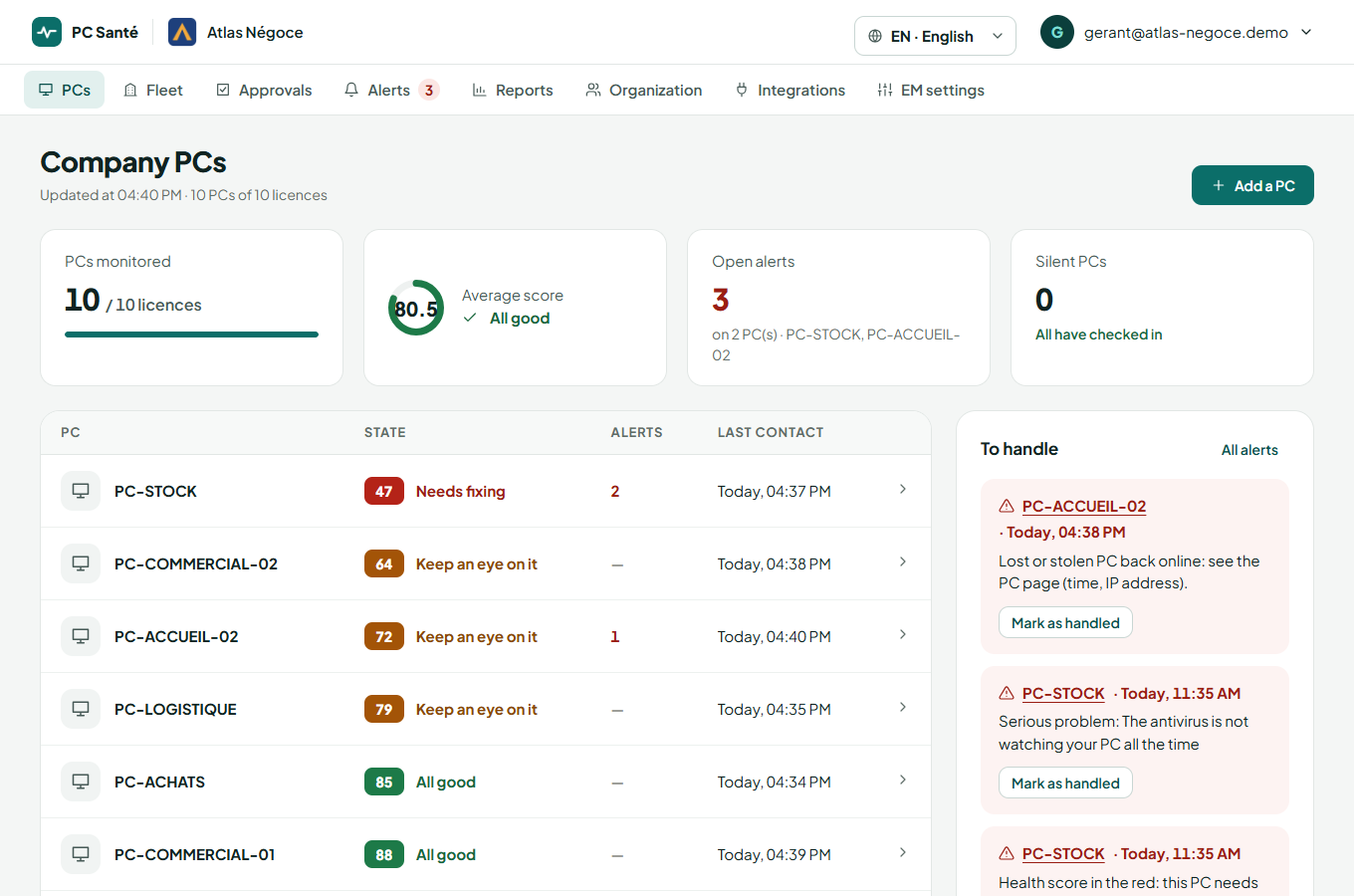
Business console
Follow each PC’s health
Each PC’s score, e-mail alerts, reports, your logo on documents.
179 MAD excl. VAT per PC per year, or a flat 750 MAD excl. VAT a year for 1 to 4 PCs
Endpoint Management
Manage the fleet and access
Computer fleet management
Inventory, accounts and administrators of each PC, an employee’s departure in a few clicks.
279 MAD excl. VAT per PC per year, from 5 PCs
Option Coming soon
Respond to a lost or stolen PC
Incident response · on top of Endpoint Management
Lost mode, browser sign-out, disk protection, erasing of chosen folders.
349 MAD excl. VAT per PC per year, Endpoint Management included
Frequently asked questions
Does PC Santé replace my antivirus?
No, it complements it. It checks that your antivirus (Microsoft Defender, included with Windows, or another one) is on and up to date, and helps you turn it back on. It also takes care of everything else: speed, clean-up, hardware, good habits.
Does the autopilot do things without asking me?
Only risk-free actions: antivirus updates, scans, temporary files. Everything else waits for your “Yes”. You can choose to approve everything yourself or pause the autopilot whenever you like. Everything is logged in the Activity screen.
Can the autonomous technician do anything without me?
No. You choose its autonomy, and it only does on its own what is safe or can be undone. Restarting, closing a program, deleting your files, encrypting the disk or uninstalling: always on your “Yes”. Every intervention is recorded, checked, and can be undone for 7 days.
Where are my files backed up?
Wherever you choose: OneDrive, Google Drive, Dropbox or another online service, a USB stick, an external disk or a NAS. PC Santé checks every week that the copy is recent and warns you if not.
Do I need to be connected to the Internet?
Not for the analysis and fixes. The Internet is used for updates and licence checks; PC Santé Premium stays active for 14 days offline.
Is it risky for my PC?
PC Santé only performs planned, verified actions. Before each change it creates a Windows restore point, and every setting can be undone. Nothing is deleted without your consent.
Can I go back after a repair?
Yes. PC Santé creates a restore point before every repair, and the Backup and restore screen lets you go back to a date in one click (the PC restarts). Your documents are not touched.
Are my files protected if my laptop is stolen?
PC Santé checks that the disk is encrypted and really protected (BitLocker), and has you put the recovery key aside. Without that key, a thief cannot read your files. Depending on the Windows edition, PC Santé sets up the protection itself or tells you what to do.
What does the Engineer plan add to Premium?
You describe your problem in your own words and PC Santé finds the cause: it reads the Windows logs, recognises over 90 common problems and offers a step-by-step plan. It also adds deep Windows repairs, advanced security, an in-depth maintenance plan and the intervention report as a PDF.
Are my files sent anywhere?
No. The analysis runs on your PC. Only the licence check contacts our server, with an anonymous fingerprint of the computer. See the privacy policy.
What if I change computers?
Deactivate the licence on the old PC (a button in PC Santé) and activate it on the new one. Two transfers a year are included.
And at the end of the year?
You renew at the same price. Otherwise, PC Santé simply goes back to the Free plan: the diagnosis stays available and nothing is lost.
Who helps me if I have a problem?
Our team in Casablanca, in French or Arabic, by phone, WhatsApp or e-mail. See the Contact page.